In This Guide
- What Is a Photo Book? Types Explained
- Step 1 — Decide Your Theme
- Step 2 — Select and Organize Your Photos
- Step 3 — Choose the Right Service
- Step 4 — Pick Format, Size, and Binding
- Step 5 — Design Your Layouts
- Step 6 — Captions, Cover, and Finishing Touches
- Step 7 — Review, Proof, and Order
- How Much Does a Photo Book Cost?
- Pro Tips
- FAQ
What Is a Photo Book? (Types Explained)
A photo book is a professionally printed book filled with your own photos. Unlike a traditional photo album with plastic sleeves, a custom photo book is printed directly onto high-quality paper with full-bleed layouts, custom text, and a bound cover. Think of it as turning your phone photos into a real book.
There are several types:
- Hardcover photo book — The most popular choice. Durable, display-worthy, ideal for gifts and coffee tables. See our coffee table photo book ranking →
- Softcover photo book — Lighter, more affordable, great for everyday albums and casual collections.
- Lay-flat photo book — Pages open completely flat, allowing photos to span two pages without a crease. Premium option for wedding and landscape photography.
- Mini photo book — Small format (typically 6x6 or smaller). Quick, affordable keepsakes.
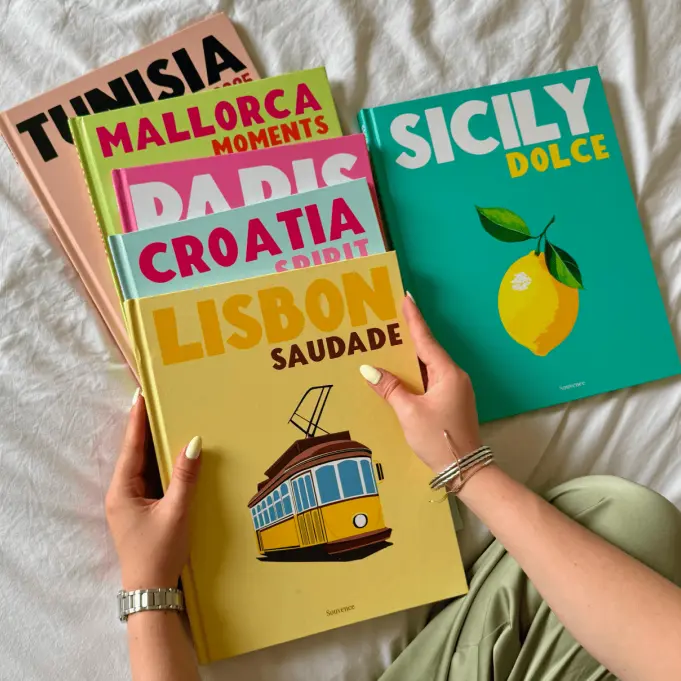
- Coffee table book — Large format, premium paper, designed for display. The Assouline-style trend has made these hugely popular in 2026.
1 Decide Your Theme and Purpose
Before you touch a single photo, decide what story your book tells. Your theme determines everything: which photos to include, how to organize them, and which service to use.
Popular photo book themes:
- Travel — One destination per book. Italy, Japan, a road trip. The #1 use case in 2026. See our travel photo album ranking →
- Family year-in-review — Highlights from the year. Holidays, birthdays, everyday moments. See our family album ranking →
- Wedding — Ceremony, reception, portraits, details. See our wedding album ranking →
- Baby's first year — Month-by-month milestones.
- Gift — A personalized photo book for mom, grandparents, a partner. See our gift guide →
- Aesthetic display — A beautiful object for your coffee table or bookshelf. See our aesthetic travel photo book guide →
2 Select and Organize Your Photos
This is where most people get stuck. You have 2,000 photos on your phone. How do you choose?
How Many Photos Do You Need?
For a standard 20-30 page photo book, 30-50 photos is the sweet spot. Here is a rough guide:
- Mini book (12-16 pages): 15-25 photos
- Standard book (20-30 pages): 30-50 photos
- Large book (40-60 pages): 60-100 photos
- Coffee table book: 30-50 photos with generous white space
The rule is simple: fewer photos, better selected. A book with 40 great photos beats a book with 200 mediocre ones.
Resolution Requirements for Printing
For sharp prints, your photos need to be at least 300 DPI at print size. In practical terms:
- Modern smartphone photos (12MP+) are usually fine for most layouts
- Images should be 2000+ pixels on the longest side
- Avoid screenshots, heavily cropped images, or photos saved from Instagram/WhatsApp (these are compressed)
- Most photo book services will warn you if an image is too low resolution
How to Organize Photos for a Photo Book
Three popular approaches:
- Chronological — Day 1, Day 2, Day 3. Simple and classic.
- By emotion or theme — "Arrival," "Golden Hour," "The Food," "The Last Day." The trending 2026 approach for aesthetic travel photo books.
- By person or location — Group photos by who is in them or where they were taken.
3 Choose the Right Photo Book Service
This is where most guides fail you. Every tutorial online pushes one specific service — their own. At printcompare.co, we test photo book services independently and compare them on 6 objective criteria. Here is how the top 5 stack up for making a photo book:
| Service | Score | Price | Creation Time | Best For |
|---|---|---|---|---|
| Souvence Our Pick | 9.2/10 | $29.90 | Under 10 min | Most people |
| Artifact Uprising | 8.6/10 | From $59 | 30-60 min | Premium / linen |
| Mixbook | 8.4/10 | From $39.99 | 2-6 hours | Full customization |
| Shutterfly | 7.5/10 | From $24.99 | 30-60 min | Budget (on sale) |
| Blurb | 7.8/10 | From $14.67 | 2-8 hours | Pro / InDesign |
Best for Beginners: Souvence
Souvence is the easiest way to make a photo book. Upload your photos, choose an illustrated cover, and the editor handles the layout automatically. Under 10 minutes from start to order. $29.90 with free shipping. No design skills required. This is the service we recommend for first-time photo book makers.
Best for Full Customization: Mixbook
Mixbook offers the most powerful drag-and-drop editor. Move photos anywhere, resize freely, add backgrounds, stickers, and text. You can also import Canva templates. The trade-off: expect 2-6 hours of design work to get a great result.
Best for Professionals: Blurb
Blurb supports Adobe InDesign and Lightroom integration, making it the choice for photographers who want pixel-perfect control. BookWright (their free editor) is also solid. Starting at $14.67, it is the cheapest option — but quality varies by paper and binding choice.
Best Budget Option: Shutterfly
Shutterfly runs 40-50% off sales nearly every week. During a sale, a hardcover photo book drops to $15-20. Print quality is mid-range, but for budget-conscious projects it works. See current Shutterfly discount codes →
How to Make a Photo Book from Your Phone
If you want to create a photo book from your phone, the best mobile-first services are:
- Souvence — Mobile-optimized editor, under 10 minutes
- Chatbooks — Auto-creates books from your camera roll (review)
- Mixbook — Full mobile editor with drag-and-drop
4 Pick Your Format, Size, and Binding
Size Guide
| Size | Best For | Display |
|---|---|---|
| 6x6 / 7x7 | Mini books, quick gifts | Shelf, nightstand |
| 8x8 | Versatile everyday albums | Bookshelf |
| 8.5x11 / A4 | Standard photo books | Bookshelf, table |
| 11x8.5 landscape | Travel, landscape photos | Coffee table |
| 11x14 / 12x12 | Premium display, wedding | Coffee table, centerpiece |
Binding Types Explained
- Perfect bound — Standard binding. Pages curve slightly at the spine. Most affordable.
- Lay-flat — Pages open completely flat. Ideal for photos spanning two pages. Premium option available from Artifact Uprising, Mixbook, and MILK Books.
- Saddle stitch — Stapled binding for thin booklets. Budget mini books only.
- Wire-o / spiral — Pages flip 360 degrees. Less common for photo books.
Paper Types
- Matte — No glare, no fingerprints. Best for coffee table books and display.
- Semi-gloss — Slight sheen, vivid colors. Good all-around choice.
- Glossy — Maximum color pop but shows fingerprints. Better for albums stored than displayed.
- Uncoated / recycled — Gallery-like feel. Artifact Uprising's signature paper.
5 Design Your Layouts
Photo Book Layout Tips for Non-Designers
You do not need to be a designer to create a beautiful photo book. Follow these principles:
- Less is more — 1-3 photos per spread. Let each image breathe.
- White space is your friend — Empty space around photos makes them feel intentional, not cramped.
- Think in double-page spreads — View your book as a series of spreads, not individual pages. Balance left and right visually.
- Be consistent — Same margins, same font, same layout rhythm throughout. Consistency is what makes a book feel professional.
- Alternate pace — Mix single-photo spreads with multi-photo layouts. Follow an intense detail shot with a calm landscape. Create visual rhythm.
Photo Book Layout Ideas
- Full-bleed hero shot — One photo spanning the entire spread. Use for your strongest images.
- Grid layout — 2x2 or 3x3 grid of smaller photos. Good for detail shots and candids.
- Photo + text — One photo on the left, caption or story text on the right.
- Before/after or then/now — Two related photos side by side.
- Texture page — Close-up details (cobblestones, food, fabric) between main photos. The 2026 aesthetic trend.
Typography Tips
- Use 1-2 fonts maximum throughout the entire book
- Sans-serif fonts (like Inter, Helvetica, or Lato) work best for modern photo books
- Keep captions under 15 words
- Title text: 18-24pt. Body/captions: 10-12pt.
- Avoid placing text over busy areas of a photo
6 Captions, Cover, and Finishing Touches
Writing Effective Captions
Captions add context and emotion. Keep them short:
- Good: "Sunset in Santorini, June 2025"
- Good: "The moment she said yes"
- Too much: "This was taken on the third day of our trip when we walked to the cliff at sunset and it was really beautiful"
Not every photo needs a caption. Let strong images speak for themselves.
Cover Design
Your cover is the first thing people see. Options:
- Illustrated covers (Souvence) — Artist-designed, luxury feel, no design work needed. Best for Assouline-style coffee table books.
- Linen covers (Artifact Uprising) — Tactile, minimalist, premium. Best for weddings and milestone books.
- Photo covers (Shutterfly, Mixbook) — Your own photo on the front. Works well if you have a standout hero image.
- Text-only covers (Blurb) — Clean typography on a solid color. Best for professional portfolios.
7 Review, Proof, and Order
Pre-Print Checklist
- Every photo is sharp and high-resolution (no yellow warning icons)
- Text has no spelling or grammar errors
- No photos are accidentally cropped at the spine
- Page order tells a coherent story
- Cover title and text are correct
- Captions match the right photos
- Color looks accurate in the preview
- Shipping address is correct (especially for gifts)
How Much Does a Photo Book Cost?
Prices vary significantly by service, size, page count, and cover type. Here is a real pricing comparison for a standard hardcover photo book (20-30 pages, A4/8.5x11):
| Service | Base Price | Extra Pages | Shipping | Total (est.) |
|---|---|---|---|---|
| Souvence | $29.90 | Included | Free | $29.90 |
| Chatbooks | $15.00 | ~$0.35/pg | $5.99 | ~$25-30 |
| Shutterfly | $24.99 | ~$0.69/pg | $8.99 | ~$40-50 |
| Shutterfly (50% off) | ~$12.50 | ~$0.35/pg | $8.99 | ~$25-30 |
| Mixbook | $39.99 | ~$0.99/pg | $9.99 | ~$55-70 |
| Artifact Uprising | $59.00 | ~$1.50/pg | $7.99 | ~$75-95 |
| Blurb | $14.67 | Varies | $5.99+ | ~$25-45 |
Best value: Souvence at $29.90 all-in delivers the best combination of quality and price. Cheapest option: Shutterfly during a 50% off sale or Blurb's economy format. Premium: Artifact Uprising for linen covers and museum-quality paper. See our affordable photo albums ranking →
Pro Tips for Making a Great Photo Book
Frequently Asked Questions
How many photos should be in a photo book?
A standard 20-30 page photo book works best with 30-50 photos. The rule is 1-3 photos per spread — quality over quantity. For a coffee table book, aim for fewer photos with more white space. For a family yearbook, 50-80 photos across 40+ pages works well.
What is the best photo book service?
We rate Souvence as the best overall (9.2/10) for its combination of design quality, print quality, and price. Mixbook (8.4/10) is best for full customization. Artifact Uprising (8.6/10) is best for premium materials. Shutterfly (7.5/10) is cheapest during sales. See our full comparison →
How much does a photo book cost?
Prices range from $15 to $90+. Souvence is $29.90 with free shipping. Chatbooks starts at $15. Shutterfly starts at $25 (often 50% off). Artifact Uprising starts at $59. See the pricing table above for a complete comparison.
Can I make a photo book from my phone?
Yes. Souvence, Chatbooks, Mixbook, and Shutterfly all work on mobile. Souvence is the fastest (under 10 minutes). Chatbooks auto-creates books from your camera roll.
What size is best for a photo book?
For coffee table display, A4 or 11x8.5 landscape. For everyday albums, 8x8 square. For travel books, large portrait (like the Assouline style) makes photos dramatic. Choose based on how you plan to display the book.
Should I use glossy or matte paper?
Matte or semi-gloss is generally best. Matte reduces glare and fingerprints — ideal for coffee table books. Glossy maximizes color pop but shows fingerprints. Semi-gloss is a good balance for most projects.
How long does it take to make a photo book?
Souvence: under 10 minutes. Chatbooks: 5-10 minutes. Mixbook: 2-6 hours for a custom design. Production and shipping take 5-12 business days after ordering.
What resolution do I need for photo book printing?
Photos should be at least 300 DPI at print size (2000+ pixels on the longest side). Modern smartphone photos (12MP+) are sufficient. Avoid screenshots and heavily compressed social media images.